

Desktop Time Tracking App for Windows, macOS, & Linux


- Automated time tracking based on user activity
- User monitoring: user activity timeline, used apps and visited URL logging, and screenshots
- Daily statistics with missing time alerts
- Planned days off
On Debian or Ubuntu install the Debian package (.deb).
On other distributions use the AppImage.
On other distributions use the AppImage.
One-Click Timer: Activity Monitoring, Used Apps Stats, Timeline
Timeline
All time entries are added to the timeline where they can be edited or deletedManual time entry
Select a period on the timeline by dragging your mouse or enter the start and finish time in the formCustomisable form
Add or remove standard and custom fields in the time entry description form
Productive vs. unproductive time
Basing on what apps are used during a day the timer automatically calculates how much time you workApplication usage stats
Application activity is shown on the timeline for accurate time trackingOne-click timer
Start the timer with one click. It will track what you do, pause when you are away or not working, and continue once you are back to work

Thu, Nov 19, 2026
00:01:10

8:58
08:58
Use the app timeline to
add time manually or
adjust recorded periods
add time manually or
adjust recorded periods
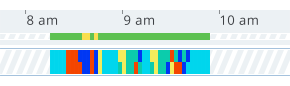

- Drag on the timeline to add a new range
- Adjust already recorded periods by dragging the left or right border of a time range
One-click timer, timesheet, calendar with daily totals, alerts, and days off
Time logged, activity time, productive/unproductive time, wage and activity score
Screenshots, logging visited URLs and used apps

Get Started for Free!

Process collected data in the cloud
Data collected by Trackabi Desktop Timer is synchronised with the cloud and is available for reviewing and processing in the web version of Trackabi