

- Getting Started
- Time Tracking
- Monitoring & Productivity
- Work Management
- Time Off & Scheduling
- Reports & Finance
- Administration & Settings
- Integrations
- API
- FAQ
Desktop Timer Application
Dernière mise à jour :
The Trackabi desktop application is the most powerful tool in the Trackabi suite, available for Windows, macOS, and Linux. It is designed for users who work primarily at a computer and need a high-precision way to log hours, analyze productivity, and maintain accurate records.
How to Install: To download and install the app on your device, please visit our Desktop Application page.
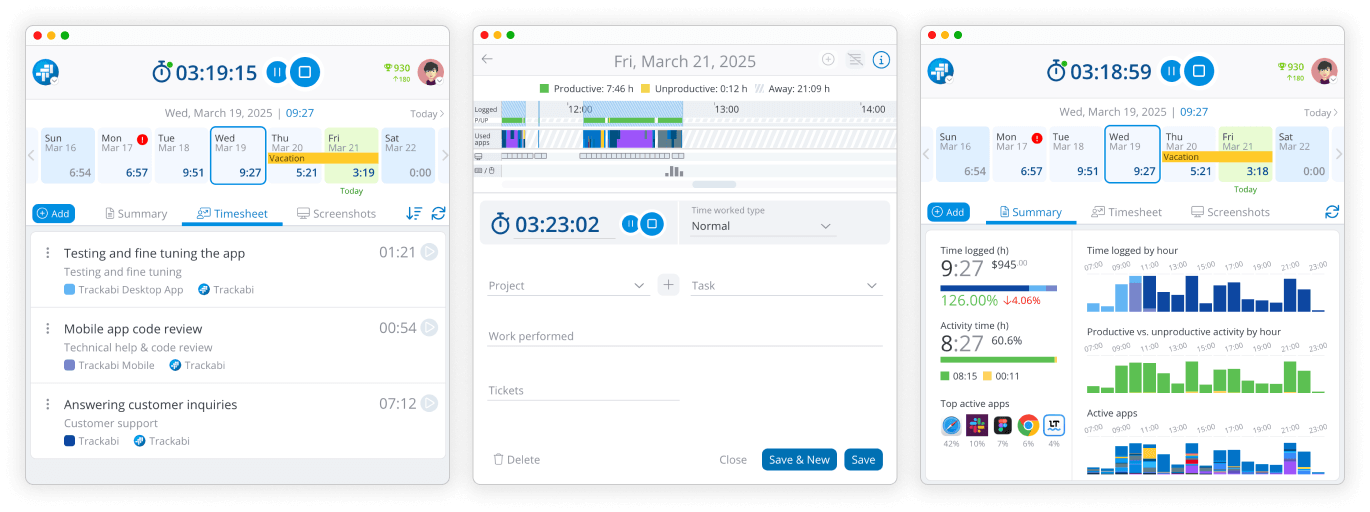
As part of the Trackabi cloud, all data collected by the app is instantly synced to the web version for management review and reporting.
Core Features
The desktop app goes beyond simple time logging to provide a comprehensive look at your workday:
- Automated Time Tracking: The timer can start and stop automatically based on your activity and whether you are using productive or unproductive applications.
- User Activity Recording: View a detailed timeline of every application used throughout the day.
- Productivity Analysis: Track productive vs. unproductive time based on your organization’s specific productivity rules.
- User Activity Score: Receive an engagement score calculated from mouse and keyboard usage levels.
- Screenshot Capturing: The app can be configured to capture periodic screenshots of your desktop for activity verification.
- Window and Browser Logging: Log the titles of opened windows and specific browser tabs to provide context for your work.
- Personal Timesheet Management: View and edit your time entries, whether added manually or recorded via a timer. Note that the ability to edit existing time entries may be restricted by an account manager through the web interface.
- Daily Statistics: Access an hourly breakdown comparing your logged time against actual desktop activity and application usage.
Although many organizations use the desktop application for employee monitoring, gathering these activity statistics also provides significant value to individual users. Having a detailed record helps you remember exactly what you were working on at any given time, allowing you to prepare more accurate timesheets and better analyze your own personal productivity.
Guides for the desktop application
- Installing & Signing In — installing on each platform, the two ways to sign in, the permissions macOS asks for, and how updates arrive.
- The Desktop App Window — the header and timer, the strip of days, and the Summary, Timesheet, and Screenshots tabs.
- Logging Time in the Desktop App — the time entry editor, the daily activity timeline, and turning recorded activity into timesheet entries.
- Desktop App Settings — every option on the General, Time Tracking, and Productive/unproductive apps tabs.
- Trackabi Desktop on Linux (Wayland) — what a Wayland session needs before the active window, keystrokes, and screenshots can be recorded.
Flexible Time Logging
Recording your work hours is easy and can be done in two ways:
- Manual Form: Log time by entering specific start and end times along with task details.
- Timeline Dragging: A unique feature that allows you to simply click and drag your mouse over any period on your activity timeline to quickly convert that activity into a time entry.
Both are described in Logging Time in the Desktop App.
Calendar & Workplace Insights
The app features an integrated calendar that keeps all your essential work data in one place. You can view:
- Daily time logs and specific time types (such as overtime).
- Personal leaves and public holidays.
- Alerts for missing time, ensuring you never forget to log a day’s work.
Monitoring Data
Managers can access gathered insights—including screenshots and application logs—via the Insights section in the web interface. Access to this data is restricted to users with the appropriate role-based permissions.